
Chapter 4 · 4.4
Domain pointers: a second domain name for the same site
Do you have more domain names for the same website? For example bakkerijjansen.nl and bakkerij-jansen.nl, or also the .be or .com version? Then you don't need to create a second website. With a domain pointer, you can make an extra domain name point to your existing website. In Mijn WebOké, this is called an alias.
Two types of pointers
| Type | What does the visitor see? | When to use it? |
|---|---|---|
| Alias (Create as an Alias ticked) | The visitor types bakkerij-jansen.nl and keeps seeing that address, with the content of your website. | If both names are equally important. Emails sent to the second domain are then also received on your main domain. |
| Redirect (tick unticked) | The visitor types bakkerij-jansen.nl and ends up on bakkerijjansen.nl. The address bar shows your main domain. | Usually the best choice: search engines see one website and no duplicate content. |
Creating a domain pointer
- At the top right, choose the domain of your website (the target) in the domain selector.
- In the menu, under Account Manager, click Domain Pointers (1).

You'll now see the pointers for your domain. At the top is the CREATE DOMAIN POINTER button (1). Next to Pointers (2), you'll see how many pointers you have and how many your package allows. With Set Local Mail and Set Remote Mail (3), you can later decide per pointer whether email arrives at WebOké or somewhere else.

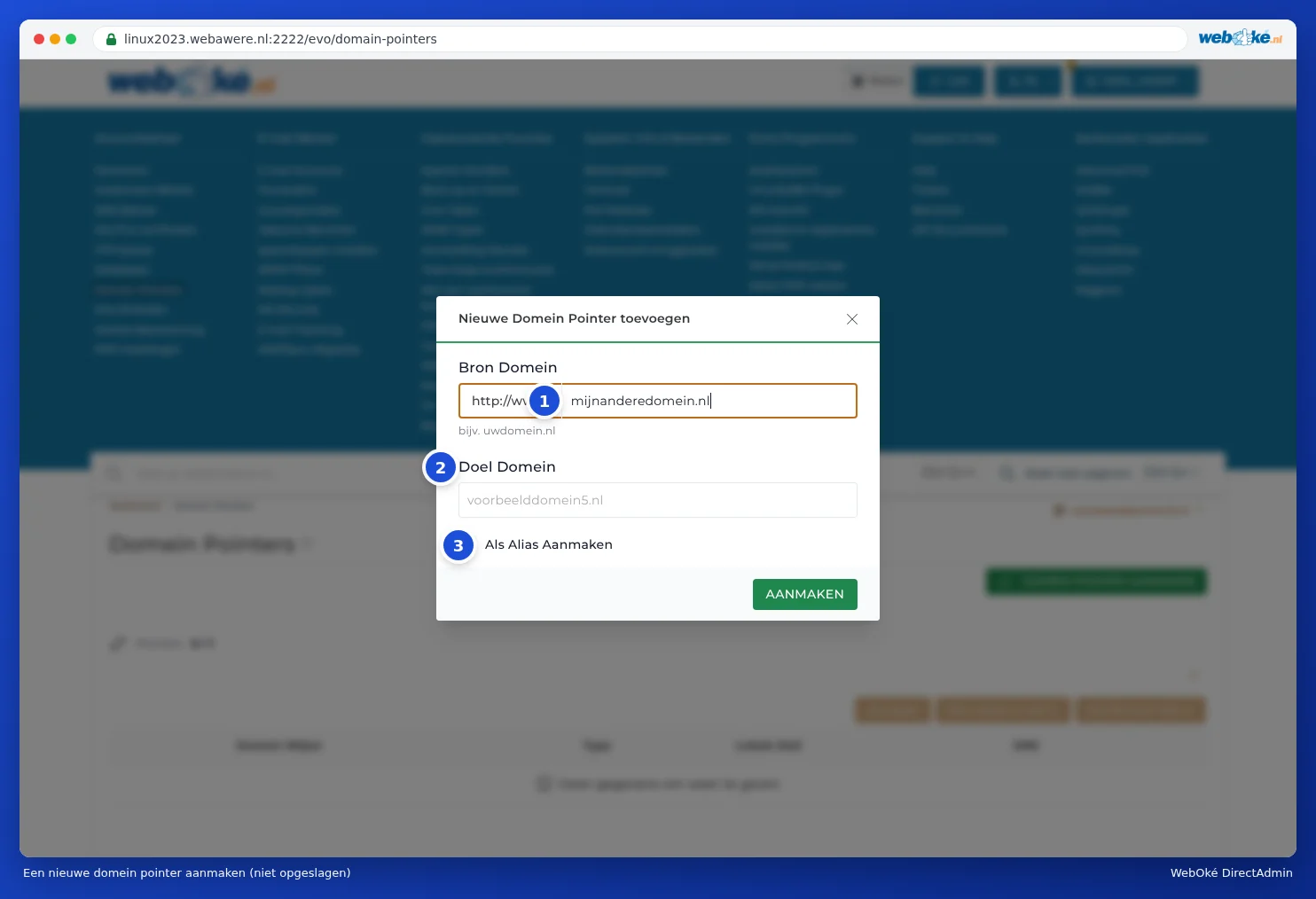
- Click CREATE DOMAIN POINTER. The Add New Domain Pointer window opens.
- Next to Source Domain (1), enter the extra domain name, without www. Next to Target Domain (2), your website is already filled in.
- Leave Create as an Alias (3) ticked if the visitor should keep seeing the extra domain. Untick it if you want to redirect instead.
- Click CREATE.
Then make sure the extra domain points to us. If it's with WebOké, this is usually already the case. If it's hosted elsewhere, set the nameservers to ns1.webawere.nl and ns2.webawere.nl, or point the A record to the IP address of your package.
I don't see Domain Pointers in the menu
Then your package doesn't have room for pointers. The same applies if you get the message Kan geen andere Domein Pointer aanmaken, with U heeft uw toegewezen limiet al bereikt underneath. You can increase the number of pointers in Mijn WebOké: go to My Products, click Admin next to the package, and increase the number of Aliases under Configurable options. Click Save options.
Pointer, extra domain or redirect?
- Same website, different name: domain pointer.
- Different website with its own content and its own email: extra domain (see Adding an extra domain).
- Just redirecting to a site hosted elsewhere, or redirecting just one page: Site Redirect (see Site Redirects: forwarding a domain or page).
Good to know
- A pointer follows the settings of the main domain. In MX Records, you'll see the Affect Pointers option: this also applies an MX change to the pointers (see MX records: where does your e-mail arrive?).
- If you want https on the extra domain, the pointer must also be included in the SSL certificate. DirectAdmin includes pointers that point to the server when requesting one automatically (see Certificate for www, subdomains and wildcard).
- A pointer doesn't have its own email addresses. With an alias, mail for info@bakkerij-jansen.nl arrives at info@bakkerijjansen.nl.